Student Notion Template
Plan and achieve your academic goals and tasks effortlessly with this all-in-one Student Notion Template.

Organize your course with the complete Student Notion Template System
This Student Notion Template is designed to give you better control over all the assignments, exams, and projects of an academic year. For both college and high school students, this template will help you better manage your priorities and handle multiple subjects at once without effort.

Dashboard
The first glance of your template is equipped with automations so you can quickly add a task to the list without having to access the section or add a new deadline to your calendar. Also you will be able to see the pending tasks for the day and some reminders.

Tasks
Organize tasks by priority. In addition to the database views, they will be organized in an Eisenhower matrix. You can visually see in which order to execute the tasks. Focus on what’s important and urgent, optimizing your productivity.
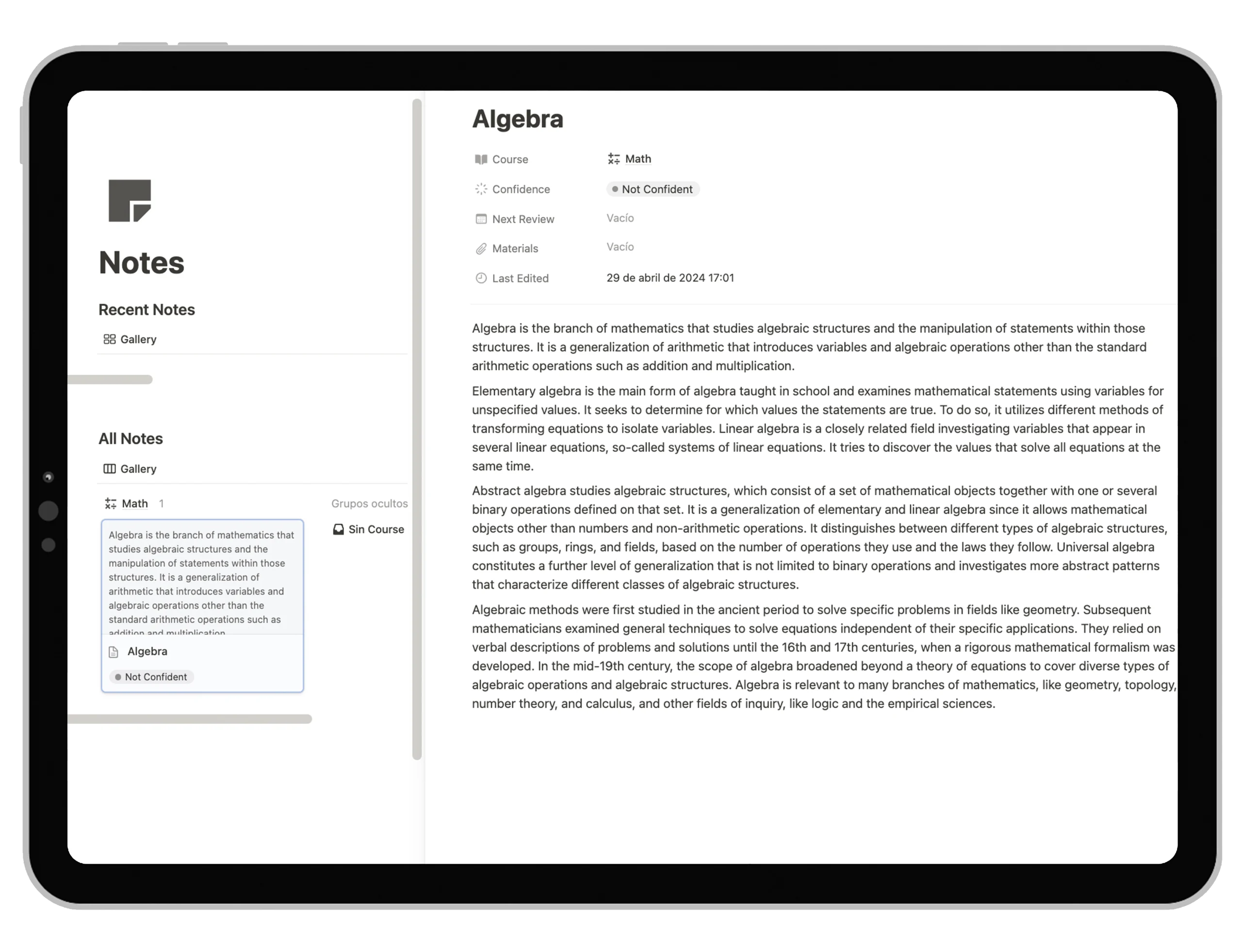
Notes
Take loose notes in class or while studying in an organized way. You will never lose notes again. The notes section allows you to categorize and link your notes to specific courses, topics, or projects.

Classes
Keep track of all your subjects in one place. With this template, you can organize course materials, syllabi, and schedules efficiently. Easily access all the essential information for each class and stay ahead in your academic journey.

Exams
Never miss an exam date again. Input all your exam schedules into the template and get automatic reminders. Prepare ahead by organizing study materials and revision notes linked directly to each exam entry.

Assignments
Work on each project, updating its status as you go. This template helps you break down projects into manageable tasks, set deadlines, and monitor progress. Collaborate with classmates by sharing project pages and keep everyone on the same page.
Benefits of Using the Student Notion Template
I spent over 100 hours perfecting this system to ensure it works seamlessly in your everyday academic life. And to make it even better, we added a few extra features.
Manage Your Everyday Tasks
Stay on top of your priorities with easy task prioritization, scheduling, and assignment to courses or projects. Track progress, set deadlines, and add comments or attachments to stay organized and efficient.

Light and Dark Mode
The template is designed to look stunning in both light and dark modes of Notion. Feel free to switch between whenever you like.

Multi-Device Compatible
Whether you’re on your phone, tablet, or computer, have a consistent and streamlined experience across all devices.

Pomodoro Timer Integration
Enhance your productivity with the built-in Pomodoro Timer. Incorporate the Pomodoro Technique into your study sessions directly within the template to maintain focus and prevent burnout.
Here’s What Others Have to Say
Frequently Asked Questions
You scrolled to the bottom, which means you’re really interested or you still have questions. Whatever your answer is, here are the most frequently asked questions.
What is a Student Notion Template?
A Student Notion Template is a pre-designed workspace in Notion tailored specifically for students. It helps you organize your courses, assignments, exams, projects, notes, and more—all in one place.
Can I customize the Student Notion Template?
Yes, the template is fully customizable. You can tailor it to fit your unique academic needs, preferences, and style.
How can a Notion template help me organize my academic life?
The Student Notion Template centralizes all your academic information, tasks, and resources. It helps you prioritize tasks, manage deadlines, keep track of notes, and stay on top of your studies efficiently.
Will I be able to use it if I’m new to Notion?
Definitely! The template comes with video instructions to guide you through setting it up and using it effectively, even if you’re new to Notion.
Can I use it with Notion’s free plan?
Yes, the Student Notion Template works perfectly with Notion’s free plan.
How do I duplicate the Notion template?
After purchase, you’ll receive a link to the template. Simply click “Duplicate” in the top right corner to add it to your own Notion workspace.
What if I still have questions?
Feel free to reach out to us anytime. We’re here to help you get the most out of your Student Notion Template.
Get Started with the Student Notion Template Today
Make your academic life easier by adopting this comprehensive template. Whether you’re juggling multiple courses, projects, or extracurricular activities, this template is designed to streamline your workflow and boost your success.